Heart Month 🤍 Save $20 on KardiaMobile 6L | Shop Now

Kardia Logo
Blog
Support

B2B

SHOP

Kardia Logo
Kardia Logo By Alivecor

Sign up for Kardia news, updates, and other exclusive content—straight to your inbox.

  • Instagram
  • Facebook
  • Twitter
  • LinkedIn
  • (855) 338-8800

Products

  • KardiaMobile Card
  • KardiaMobile 6L
  • KardiaMobile
  • Compare Kardia Devices
  • KardiaCare
  • Device Replacement Plan
  • International
  • Where To Buy

Support

  • FAQs
  • User Manuals
  • Shipping
  • Warranty & Returns
  • (855) 338-8800
  • Mission
  • Leadership
  • Research
  • Newsroom
  • Careers
  • Instagram
  • Facebook
  • Twitter
  • LinkedIn
  • Privacy
  • Security
  • Accessibility
  • Telehealth Informed Consent
  • Terms of Service

©2024 AliveCor, Inc. All Rights Reserved. Patents www.alivecor.com/patents. AliveCor and Kardia are trademarks of AliveCor, Inc. in the United States and other countries. Apple is a trademark of Apple, Inc. registered in the U.S. and other countries. App Store is a service mark of Apple, Inc. Android is a trademark of Google Inc. Google Play is a trademark of Google Inc.

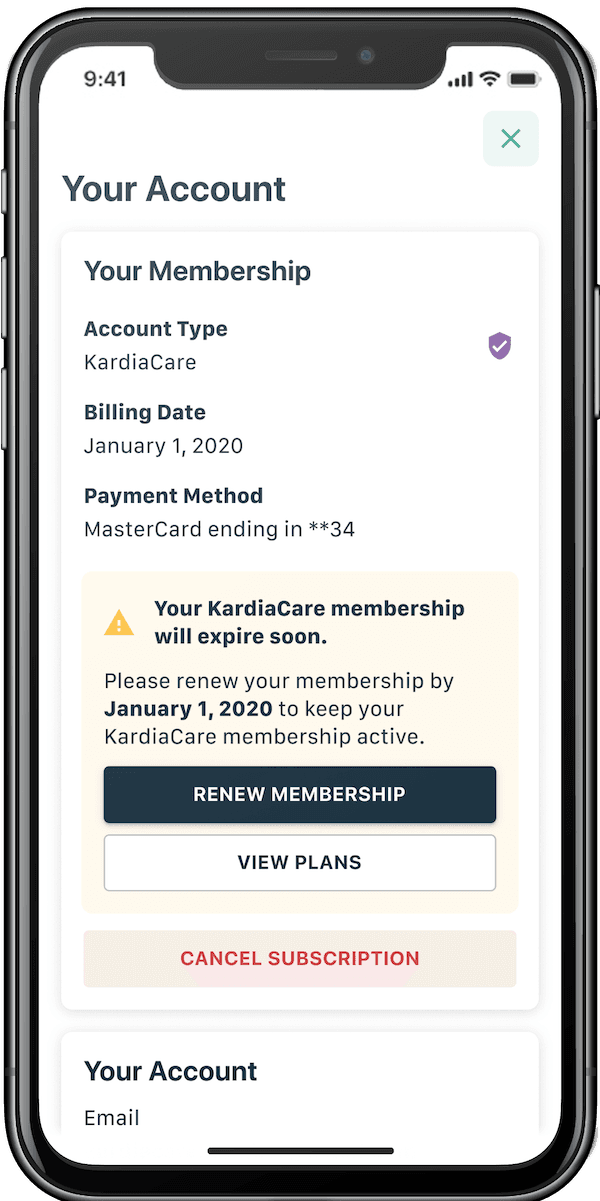
Keep your KardiaCare membership active

Follow the steps below to opt-in for auto-renewal and keep your KardiaCare membership active.

  1. Open the Kardia app on your phone
  2. Visit the Profile tab
  3. Press the “Manage Account” button
  4. Follow instructions to renew your membership
  5. Enter your payment information

It's that easy. Once you complete these steps, your KardiaCare membership will continue.

Thank you for being part of the KardiaCare community.
Auto Renewal Image